

For enriching culture trips, the right travel tech – specifically offline maps, robust audio guides, and reliable translation apps – is crucial for navigating unfamiliar cities, understanding historical sites, and communicating with locals. These tools ensure you can explore efficiently, even without consistent internet access. Think of exploring ancient ruins in Greece or local markets in Peru; having these digital aids on your smartphone enhances independent exploration, provides context for what you’re seeing, and bridges language barriers, making your cultural immersion deeper and more rewarding across Europe, North America, and South America.
Imagine wandering the labyrinthine streets of Venice, deciphering centuries-old murals in a forgotten corner of Mexico City, or trying to order a local delicacy in a bustling market in São Paulo. These are the moments that define a culture trip. And while the romance of getting lost is real, being truly prepared means embracing a bit of smart travel tech. We’re talking about the digital tools that don’t just get you from A to B, but help you understand the history, language, and nuances of the places you visit. For most readers planning culture trips, this means having solid offline maps, engaging audio guides, and accurate translation apps at your fingertips.
It’s about making your journey smoother, richer, and more connected to the local experience, whether you’re traversing ancient European capitals, exploring vibrant South American cities, or discovering historical sites across North America. The right digital companion can be the difference between a good trip and a truly unforgettable one.

Caption: A traveler uses their phone for navigation while exploring a historic European city street, highlighting the utility of travel tech.
The Unsung Hero: Offline Maps and Navigation for Explorers
One of the biggest anxieties for any traveler, especially those venturing into new cultural landscapes, is getting lost or running out of data. This is where offline maps become absolutely indispensable. They are not just about finding your hotel; they’re about discovering that hidden piazza, that tiny museum, or that local eatery tucked away from the main tourist drag. Relying on an internet connection for basic navigation in an unfamiliar city is a common mistake that can lead to frustration and wasted time.
Why Offline Maps Are Non-Negotiable
When you’re out exploring, especially in a place like the medieval towns of France or the historic centers of Colombia, your phone’s cellular signal can be patchy, or international data roaming might be prohibitively expensive. Offline maps allow you to download entire city or region maps before you leave your accommodation (or even before you leave home) and navigate using your phone’s GPS without needing any data connection. This saves battery, avoids data charges, and crucially, ensures you’re never truly stranded.
Top Picks for Offline Mapping
- Google Maps: Still the heavyweight champion for many. You can easily download areas for offline use. The coverage is generally excellent, and it integrates well with public transport information (though real-time updates will require data). Before you head to cities like Rome or New York, simply search for the city, tap its name at the bottom, and select ‘Download offline map’. It’s straightforward and reliable for most.
- Maps.me: This app truly shines for offline navigation, particularly for walkers and hikers. It uses OpenStreetMap data, which means it often has incredibly detailed paths and points of interest that Google Maps might miss. For exploring a national park in Patagonia or finding a specific monument in Buenos Aires, Maps.me can be a lifesaver. Plus, it’s open-source and free.
- Citymapper: While known for its exceptional public transport routing (which often requires data), Citymapper also allows you to download certain routes and areas for offline use. This can be fantastic for navigating complex metro systems in places like London or Paris, even when underground.
Immersive Storytelling: Audio Guides for Deeper Understanding
Seeing a landmark is one thing; understanding its historical context, cultural significance, and the stories behind it is another entirely. This is where audio guides come into their own, transforming a static sight into a dynamic narrative. They are key components of effective travel tech for culture trips.
Beyond the Museum Headset
Traditional museum audio guides are familiar, but modern travel tech extends this concept significantly. Many apps now offer location-aware audio tours that guide you through entire neighborhoods, historical districts, or even specific walking paths. Imagine strolling through the streets of colonial Cartagena, Colombia, and having a narrator explain the significance of each plaza and building as you pass it, all through your headphones. This personalized, self-paced approach allows for deeper engagement.
Gamsgo Makes Streaming Subscriptions Simple and Budget-Friendly
Recommended Audio Guide Platforms
- Rick Steves’ Audio Europe: For anyone planning a trip to Europe, Rick Steves offers a fantastic collection of free, downloadable audio tours for major cities and historical sites. These are well-researched, engaging, and specifically designed for independent travelers. Think walking tours through the Roman Forum or exploring Florence’s Uffizi Gallery with a seasoned expert in your ear.
- VoiceMap: This app features a wide range of GPS-guided walking tours created by local storytellers worldwide. Whether you’re in Prague, Rio de Janeiro, or New Orleans, you can often find unique perspectives and hidden gems that a standard guidebook might miss. Many tours are available for purchase and can be downloaded for offline use, perfect for saving data.
- Traditional Museum Apps: Many major museums and historical sites now offer their own official apps with integrated audio tours. For example, the Louvre in Paris, the Metropolitan Museum of Art in New York, or the British Museum in London often have comprehensive, multilingual guides available for download directly to your smartphone. Always check the official website before your visit.
Caption: A person using a translation app on their smartphone to communicate with a local vendor in a bustling outdoor market, illustrating language bridging technology.
Breaking Barriers: Translation Apps for Seamless Communication
Language can be a significant hurdle when immersing yourself in a new culture. From ordering food to asking for directions or simply engaging in polite conversation, a reliable translation tool is an indispensable piece of travel tech for culture trips.
More Than Just Word-for-Word
Modern translation apps go far beyond simple text input. They offer real-time spoken translation, image translation (for menus or signs), and even conversational modes. This means you can point your camera at a restaurant menu in Portugal and get an instant translation, or have a basic back-and-forth conversation with a shopkeeper in Quebec without needing a phrasebook.
Essential Translation Tools
- Google Translate: Continues to be a powerhouse. Its offline language packs are incredibly useful; download the languages you need (e.g., Spanish for South America, French for Europe/Canada) before you go. It offers text, voice, and even conversation modes. The camera translation feature is a lifesaver for reading signs or menus in cities like Berlin or Cusco.
- Microsoft Translator: A strong contender, offering similar features to Google Translate, including offline packs and camera translation. It also has a unique multi-person conversation feature, which can be great for groups interacting with locals.
- DeepL Translator: While primarily focused on text and document translation, DeepL is renowned for its incredibly nuanced and natural-sounding translations, especially for European languages. While its offline capabilities aren’t as solid as Google’s for mobile, it’s excellent for complex phrases or understanding written information.
Powering Your Digital Toolkit: Connectivity and Charging
All this fantastic travel tech for culture trips is useless if your devices run out of battery. Staying charged and connected (when needed) requires a bit of foresight.
The Rise of USB-C and Power Banks
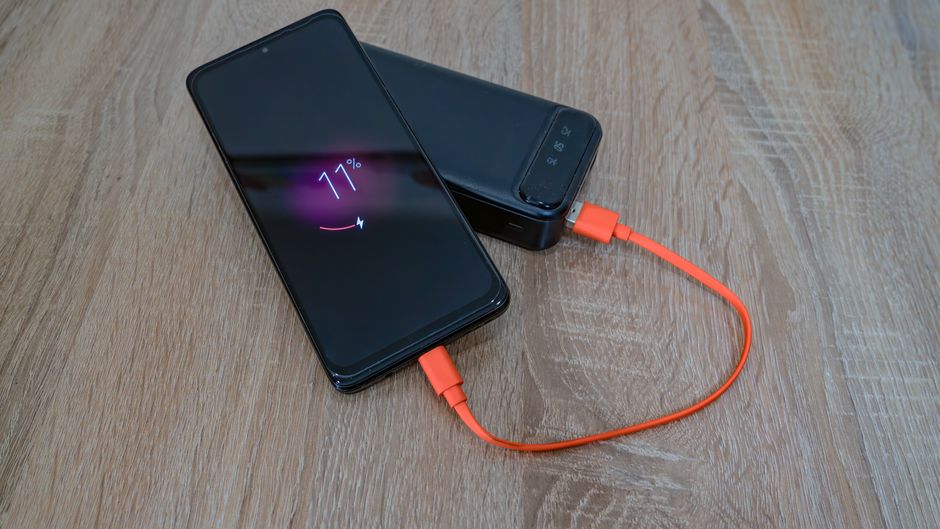
For most modern smartphones, tablets, and even many laptops, USB-C has become the universal standard. This means fewer cables to pack and faster charging. Always carry a high-capacity power bank (at least 10,000mAh, preferably 20,000mAh) to recharge your phone multiple times throughout the day, especially if you’re heavily relying on GPS and screen time. Look for ones with USB-C Power Delivery (PD) for rapid charging.
Connectivity Abroad: SIMs vs. eSIMs
While our focus is on offline tools, there will be times you need data. Consider an eSIM (digital SIM card) from providers like Airalo or Holafly. You can often purchase and activate a local data plan for Europe, North America, or South America directly from your phone before you even land, avoiding the hassle of finding a local SIM card vendor. This allows for quick online map checks, confirming reservations, or emergency communication.
Security and Convenience: Passkeys and Digital Wallets
Traveling involves managing bookings, accessing accounts, and making payments. Modern security features like passkeys and digital wallets streamline these processes.
Enjoy Fresh Coffee Anywhere With Outin Portable Innovation
Simplifying Access with Passkeys
Passkeys are a newer, more secure way to log into online accounts, replacing traditional passwords. They use cryptography and are tied to your device (like your phone’s fingerprint reader or Face ID), making them phishing-resistant and much harder to steal. For managing flight bookings, hotel reservations, or accessing cloud storage for your travel documents, enabling passkeys where available (e.g., for your Google account or other travel service providers) adds a layer of convenience and security.
Digital Wallets for Easy Payments
Google Pay, Apple Pay, and other digital wallet services are widely accepted in many parts of the world, especially in North America and Europe. Having your credit and debit cards stored securely on your phone means you can often leave your physical wallet tucked away, reducing the risk of loss or theft. This is particularly convenient in busy markets or when using public transport in cities like Mexico City or Barcelona.
FAQ: Your Travel Tech Questions Answered
What’s the best way to handle phone charging overseas to avoid issues?
Always carry a universal travel adapter, as plug shapes vary significantly across Europe, North America, and South America. Ensure your phone charger is dual voltage (most modern smartphone chargers are, displaying ‘100-240V’ on them). A high-capacity power bank is also essential for keeping your devices powered throughout long days of exploration without needing an outlet.
Can I rely solely on offline maps for navigation in complex cities like Paris or Tokyo?
For primary navigation, yes, offline maps like Google Maps or Maps.me are highly reliable. However, for real-time public transport updates (e.g., unexpected metro delays), a brief internet connection can be beneficial. Download transit maps too, if available, for a comprehensive offline solution. Always review your route briefly when you do have Wi-Fi.
Are translation apps accurate enough for important conversations?
For basic tourist interactions like ordering food, asking for directions, or polite conversation, modern translation apps (especially Google Translate and Microsoft Translator) are remarkably effective. For sensitive or complex discussions, they can serve as a helpful bridge, but it’s always wise to speak slowly and clearly, and simplify your sentences. Don’t expect perfect nuance.
How can I secure my digital travel documents and photos while abroad?
Utilize cloud storage services like Google Drive, Dropbox, or iCloud to back up important documents (passport copies, visa info, reservations) and photos regularly. Enable passkeys for these accounts for enhanced security. Consider using a password manager for all your online logins. For physical documents, consider a secure, encrypted flash drive as an additional backup.
Is it worth buying an international SIM card or relying on an eSIM?
An eSIM is generally more convenient and often more cost-effective for short to medium-term travel. You can purchase and activate a data plan digitally before you arrive, avoiding physical SIM card swaps and potential language barriers at local shops. For longer stays or specific remote areas, a local physical SIM might offer better rates or coverage.
Conclusion: Embrace Smart Travel for Richer Culture Trips
The right travel tech for culture trips isn’t about staring at screens; it’s about enhancing your connection to the world around you. Offline maps keep you oriented, audio guides deepen your understanding, and translation apps open doors to local interaction. By integrating these tools, along with smart charging and security practices like USB-C and passkeys, you’re not just traveling, you’re truly immersing yourself. These technologies are designed to remove friction, leaving you free to focus on the magic of discovery, whether you’re admiring Gaudi’s architecture in Barcelona, exploring ancient Inca ruins near Cusco, or delving into the history of Washington D.C. Equip yourself wisely, and let your cultural adventure truly begin. Read more practical technology guides on Vie En Mots.