

Before committing to new software, small businesses and freelancers should meticulously track their current operational workflows, pinpoint existing inefficiencies, and analyze the utilization and cost-effectiveness of their current tools. This data-driven approach helps identify genuine needs versus perceived ones, prevents redundant purchases, and ensures any new investment directly addresses a quantifiable problem, ultimately saving money and improving productivity rather than just adding another monthly subscription.
You’ve seen the ads: a sleek new tool promising to automate your life, streamline your sales, or make your marketing campaigns sing. As a freelancer or small business owner, the allure of a shiny new software subscription is powerful. It feels like progress, like you’re staying ahead of the curve. You might even click ‘subscribe’ with the best intentions, only to find yourself six months later with an inbox full of unused login details and a credit card statement groaning under the weight of recurring fees for tools you barely touch.
This isn’t just about wasting a few dollars; it’s about wasted time and mental energy. Every unused subscription is a reminder of a problem you thought you had, or a solution you didn’t fully implement. The real challenge isn’t finding software; it’s understanding exactly what problems you’re trying to solve before you ever open your wallet again. That’s why knowing what small businesses should track before buying more software is paramount.
Many a freelancer in Montreal, Sao Paulo, or across the EU market has felt the sting of subscription overload. They might sign up for a CRM they don’t use, a project management tool that’s too complex, or an email marketing platform that never sees a campaign. The core issue? A lack of prior assessment. Without a clear picture of what’s truly needed, you’re just throwing darts in the dark, hoping something sticks.

Laying the Groundwork: Essential Tracking Points
Before you even think about new features or shiny dashboards, a systematic review of your current operations is in order. Here are the key areas to focus on:
- Time Allocation: How much time do you spend on specific tasks daily, weekly, and monthly? Be brutally honest.
- Manual Process Points: Where do you manually transfer data, copy-paste information, or perform repetitive, non-creative work?
- Existing Software Usage: Which tools do you currently pay for, and how often do you genuinely use each feature?
- Cost vs. Value: What’s the monthly or annual cost of each existing tool, and what tangible value does it deliver?
- Communication Channels: How do you currently communicate with clients, team members, and collaborators? Are there bottlenecks?
- Data Management: Where is your critical business data stored? Is it fragmented, or easily accessible?
- Client Experience Touchpoints: Map out the entire client journey from first contact to project completion. Where are the friction points?
Understanding Your Current Workflow: The Foundation of Smart Spending
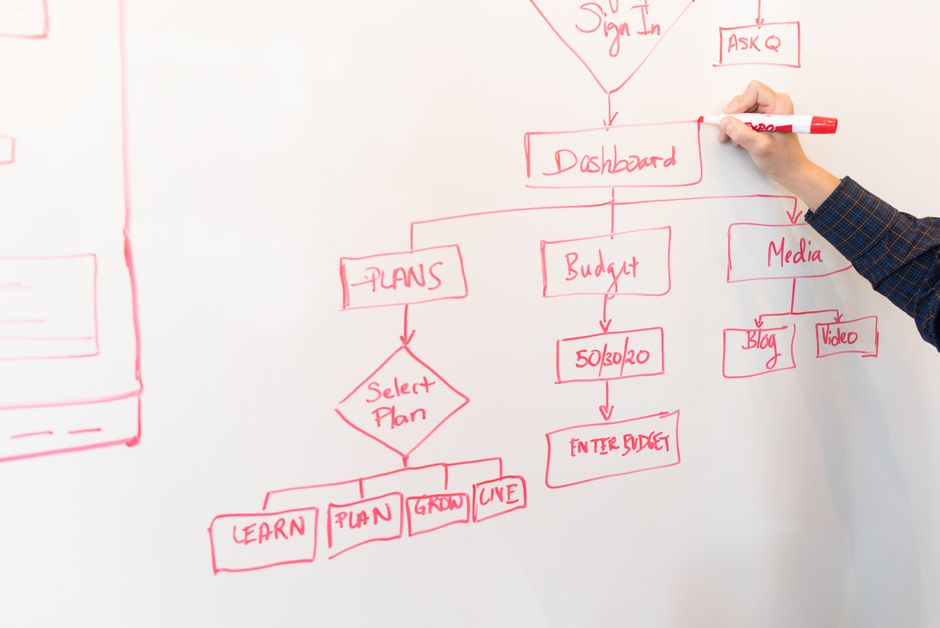
One of the biggest mistakes small businesses make is buying software to solve a vague problem. ‘I need to be more organized,’ or ‘My marketing isn’t working,’ are not specific enough to warrant a software purchase. Instead, you need to map out your current workflows in detail. This means documenting every step of a process, from inquiry to invoice.
Mapping Your Daily Operations
Take client onboarding, for example. What happens from the moment a potential client expresses interest until they’re fully integrated and working with you? Does it involve emails, proposals, contracts, project setups, and introductions? Where are the manual steps? Perhaps you’re manually creating invoices in a Word document, then converting to PDF, then emailing. This is a clear manual process point. A freelancer in London might find they spend hours each week chasing signatures on proposals, a common friction point that can be easily identified with careful tracking.
For a freelance web designer, this could look like:
- Initial client inquiry (email/form)
- Schedule discovery call (manual calendar juggle)
- Discovery call (notes taken manually)
- Draft proposal (copy-paste from old proposals, manual edits)
- Send proposal (email attachment, no tracking)
- Client feedback/revisions (email back-and-forth)
- Contract generation (manual template filling)
- Signature collection (print, sign, scan, email or relying on Docusign free tier limits)
- Project setup (manual setup in Asana/Trello, create client folder in Drive)
- Invoice generation (manual in QuickBooks/Xero, email)
By breaking it down, you see the true pain points. The software you need isn’t just ‘project management’ – it’s something that addresses proposal creation, e-signatures, and automated project setup.
Analyzing Current Software Usage and Cost-Effectiveness
Before you consider adding a new tool, thoroughly review the ones you already have. Many small businesses are subscribed to tools they barely use, or they’re paying for premium features they don’t need. This is a particularly prevalent issue in North America, where the SaaS market is incredibly saturated.
Corsica Ferries Tickets | Routes, Prices & Easy Booking
The Subscription Audit
List every single software subscription you pay for. Don’t forget the obscure ones that bill annually and only pop up once a year. For each, ask yourself:
- What was the original reason I bought this?
- How often do I actually use it? (Be specific: daily, weekly, monthly, never?)
- Am I utilizing its core features to their full potential?
- Does it integrate well with my other essential tools?
- What’s the monthly/annual cost?
- What tangible value does it provide for that cost?
You might find you’re paying for Canva Pro but only using basic features available in the free tier, or you have an advanced CRM when a simple Google Sheet would suffice for your current client volume. A freelancer in Berlin might realize they’re paying for a sophisticated email marketing platform but only sending out one newsletter a quarter – a task easily handled by a more affordable or even free solution like MailerLite or ConvertKit’s free plan.
Identifying Genuine Pain Points vs. Perceived Needs
This is where critical thinking comes in. A ‘pain point’ is a quantifiable problem that causes demonstrable inefficiency, stress, or lost revenue. A ‘perceived need’ is often a desire for a feature you think you should have, or a solution to a problem that isn’t truly impacting your bottom line.
The ‘Why’ Behind the ‘What’
If you’re considering a new email marketing platform, don’t just say ‘I need better email marketing.’ Ask why. Is it because your current platform doesn’t allow segmentation? Is it too expensive for the features it offers? Are your open rates abysmal and you suspect it’s due to poor deliverability? The ‘why’ dictates the ‘what.’ If you track that you spend two hours every month manually segmenting your email list in your current tool, then that’s a genuine pain point a new platform with automation features could solve. Without this tracking, you might buy a tool that offers beautiful templates but no better segmentation, leaving your core problem unaddressed.
For freelancers across South America, say in a bustling city like Bogotá, the pressure to optimize operations for global clients is high. They might perceive a need for an expensive international payment gateway, when in reality, tracking their current transaction fees might reveal that an existing, simpler service like Wise (formerly TransferWise) or even PayPal, with a clear understanding of its fee structure, is perfectly adequate for their current volume.
Quantifying the Impact of Inefficiencies
Once you’ve identified a genuine pain point, the next step is to quantify its impact. How much time, money, or emotional energy is this problem costing you? This data is your business case for any new software purchase.
Time is Money: Putting a Value on Productivity
Let’s revisit the manual invoice creation example. If you track that you spend 30 minutes per invoice, and you send 10 invoices a month, that’s 5 hours of your time. If your effective hourly rate is $50, that’s $250 lost per month. Now, compare that to a software solution that automates invoicing for $20/month. The return on investment becomes glaringly obvious.
Another example: lost leads. If you’re a coach and you’re tracking that 20% of your initial inquiries fall through the cracks because you don’t have a system to follow up consistently, that’s a quantifiable loss. If each client is worth an average of $1000, and you lose two potential clients a month due to poor follow-up, that’s $2000 in lost revenue. A simple CRM or an automated email sequence tool suddenly looks like a smart investment, provided it directly addresses that follow-up gap you’ve identified through tracking.
The Importance of a Pilot Phase and Iteration
Even after thorough tracking, a new software solution isn’t a guaranteed home run. Smart small businesses, whether they’re in Toronto or Santiago, understand the value of a pilot phase. Don’t commit to an annual plan or the most expensive tier right away.
Test, Learn, Adjust
Most SaaS tools offer free trials or basic free plans. Use these to actually implement the software into your tracked workflow. Does it solve the problem you identified? Does it create new inefficiencies? For example, if you identified a need for better scheduling, try Calendly or Acuity Scheduling on a free tier. Track how many client meetings are booked, how much time you save on email back-and-forth, and whether clients find it easy to use. Gather feedback. This iterative approach ensures you’re making informed decisions based on real-world results, not just marketing promises.
Remember, the goal isn’t to accumulate the most software; it’s to create the most efficient, productive, and profitable business. That starts with understanding your current reality, not jumping to future solutions.
FAQ: What Small Businesses Should Track Before Buying More Software
Why is it important to track current workflows before buying new software?
Tracking current workflows helps identify precise pain points and inefficiencies, preventing the purchase of redundant or unnecessary software. It ensures any new tool directly addresses a quantifiable business problem, optimizing spending and enhancing overall operational effectiveness rather than just adding another subscription.
What are the biggest mistakes small businesses make when purchasing new software?
Common mistakes include buying software for vague problems, not fully utilizing existing tools, failing to conduct a cost-benefit analysis, and succumbing to hype without a clear understanding of their specific needs. These often lead to subscription bloat and underutilized software.
How can freelancers in the EU market ensure they pick compliant software?
Freelancers in the EU market should prioritize software providers that explicitly state GDPR compliance, offer solid data protection features, and ideally have servers located within the EU. Always review their data processing agreements and privacy policies to ensure alignment with local regulations.
What kind of tracking tools can help identify software needs?
Simple tools like spreadsheets for tracking time and expenses, project management tools like Trello or Asana for workflow visualization, or even time-tracking apps like Toggl or Clockify can be invaluable. The key is consistent data collection, not necessarily fancy software itself.
How can I avoid subscription fatigue and manage my existing software stack?
Regularly audit your subscriptions (quarterly is a good cadence), unsubscribe from unused tools, consolidate features where possible, and actively seek out free or more affordable alternatives if your needs are basic. Focus on value delivered versus just features offered.
Key Takeaways for Smarter Software Investment
The journey to a lean, efficient software stack for your small business begins long before you hit ‘buy.’ It starts with a deep, honest dive into your current operations. By meticulously tracking your time, understanding your workflows, and auditing your existing tools, you’re not just saving money; you’re building a more resilient and responsive business.
Remember, the goal of technology is to serve your business, not the other way around. Every software purchase should be a deliberate, data-backed decision that directly addresses a quantified pain point. This pragmatic approach, embraced by successful freelancers and small businesses worldwide, ensures that your investments truly pay off.
Don’t let the siren song of ‘new and improved’ distract you from what truly matters: effective, efficient operations. Focus on what small businesses should track before buying more software, and you’ll build a foundation for sustainable growth. Explore smarter business guides on Vie En Mots for more practical advice.